What are the best digital products to sell on Pinterest that actually make money?
Most beginners pick the wrong products and wonder why they’re not seeing sales.
They spend weeks creating items nobody wants, watching their motivation disappear with each failed launch.
Here’s the reality.
Pinterest users are actively buying digital products right now. Spending billions on printables, templates, and tools.
The difference between struggling sellers and successful ones isn’t talent or luck. It’s knowing exactly what sells.
This guide reveals 30 proven digital products to sell on Pinterest that beginners (and pros) are using to build passive income.
Read on to make money on Pinterest at home.
Ready to Learn How to Increase Pinterest Traffic to Your Blog? Click Here Now
Save/Pin the image below👇because I often update my posts. So stay informed with this blog “30 Profitable Digital Products to Sell on Pinterest” and save it.
This page have some affiliate links. In other words, if you buy from my links, I may get a commission. Some images were sourced from Deposit Photos
30 Digital Products to Sell on Pinterest
Below are just some of the best digital product ideas to try selling on Pinterest right now.
1. AI-Powered Digital Planners
Digital planners are like regular planners but work on any device including tablets, phones, laptops, and desktop computers.
You can create these using AI tools (Chatgpt, Claude, Abacus AI) and sell them on Pinterest. People use them in apps like Notion, GoodNotes, and Google Sheets to organize their lives.
Add features like clickable tabs, checkboxes, and links between pages.
Make planners for students, busy moms, or small business owners. Price them between $5-$15.
The best part?
You make it once and sell it forever.
Pinterest users love searching for “digital planner” and “productivity tools”, so your pins can reach thousands of buyers.
2. Printable Wall Art
Printable wall art is digital artwork that customers download and print at home.
Use AI image generators like Nano Banana Pro, Midjourney or DALL-E to create beautiful designs in minutes.
Popular styles include motivational quotes, nature scenes, and abstract art.
Sell them as instant downloads on Etsy or your own website.
Promote them on Pinterest with eye-catching pins showing the art in room settings.
You can sell single prints for $3-$8 or bundles for $15-$25.
No shipping or inventory needed—just pure profit.
3. Digital Stickers & Clip Art Packs
Digital stickers are small graphics people use to decorate their digital planners, journals, and social media posts.
Create packs with 20-50 stickers around one theme like coffee, flowers, or holidays.
You can make these using Canva, Procreate, or AI tools. Save them as PNG files with transparent backgrounds.
Sell packs for $3-$10 on Etsy or Gumroad.
Pinterest is perfect for this because people constantly search for “digital stickers” and “planner stickers”.
Show your stickers in use on sample planner pages.
Bloggers and content creators buy these regularly for their work.
4. Editable Canva Templates
Canva templates are pre-designed graphics that customers can customize with their own text and colors.
Create templates for Instagram posts, business cards, email headers, or Pinterest pins.
Make a pack of 10-30 templates around one theme.
Share them through Canva’s template link feature.
Sell template packs for $10-$30.
Pinterest users love searching for “Canva templates” and “social media templates”.
Show before-and-after examples in your pins.
Small business owners and new bloggers need these because they save hours of design work.
This product requires no special skills. Just good design sense.
5. Educational eBooks & Workbooks
Educational eBooks teach people specific skills or knowledge in a short, focused format.
Pick a niche you know well like gardening, budgeting, or starting a blog.
Write a 15-30 page guide with clear steps and helpful tips.
Add worksheets or checklists to make it more valuable.
Create it in Google Docs or Canva, then save as PDF.
Sell for $7-$27 depending on depth.
Your pins should highlight the main benefit.
Once written, it sells repeatedly with zero extra work.
6. AI-Powered Printables
AI-powered printables are worksheets and planners created using AI tools like ChatGPT, Abacus AI or specialized generators.
Make meal planners with recipe suggestions, travel itineraries for popular destinations, or various trackers (habit, fitness, expense) with motivational prompts.
The AI helps you create content faster than doing it manually.
You can design these as PDFs for printing or as editable Google Sheets templates that buyers can customize
Sell individual printables for $2-$5 or bundles for $10-$20.
Show clear preview images of your printables filled out with examples.
Busy parents and organized planners love these time-saving tools.
7. Digital Coloring Books
Adult coloring books are detailed designs people color digitally on tablets or print at home.
Create 20-50 pages with intricate patterns, mandalas, nature scenes, or inspirational quotes.
Use Canva, Kittl, Gemini Nano Banana Pro or AI art generators to make the line art.
Save each page as a high-quality PDF.
Sell complete books for $8-$15.
Pinterest is huge for this niche with searches like “adult coloring pages” and “printable coloring book”.
Show a colored example next to the blank version in your pins.
People buy these for stress relief and creative hobbies.
No artistic talent needed if you use AI tools.
8. AI Resume & Canva Templates
Resume templates help job seekers create professional-looking resumes quickly.
Design 5-10 different resume layouts in Canva with modern, clean styles.
Include matching cover letter templates.
Use AI to write sample content and job descriptions for different careers.
Make them easy to edit with clear instructions.
Sell template packs for $8-$20.
Show the full resume in your pin with a professional photo mockup.
College students and career changers desperately need these.
Add templates for different industries like teaching, nursing, or tech jobs.
9. Interactive Planners for GoodNotes & Notability
Interactive planners are digital files designed specifically for note-taking apps on iPads. Add clickable tabs, hyperlinks between pages, and text boxes people can type in.
Create weekly planners, budget trackers, or student organizers. Make them in PowerPoint, Keynote, or specialized planner software.
Export as PDF. Sell for $8-$18 each.
Show video pins demonstrating the interactive features.
iPad users love these because they feel like real planners but with digital convenience. This niche has passionate, repeat buyers.
10. Stock Photos & Graphic Packs
Stock photos are professional images that bloggers and businesses use on their websites and social media.
Create themed collections like “cozy home office,” “healthy food,” or “spring flowers.”
Take your own photos or use AI image generators.
Make packs of 20-50 images.
Sell for $15-$40 per pack.
Create sample pins showing 4-6 images from your pack.
Bloggers need fresh images weekly, so they become repeat customers.
This works well because you’re selling to other content creators like yourself.
11. Printable Wall Art with White-Label Rights
PLR (Private Label Rights) means customers can rebrand and resell your designs as their own.
Create bundles of 10-30 printable wall art pieces that buyers can sell in their own shops.
Include the editable files in Canva or PSD format plus commercial use license.
Sell PLR kits for $27-$97 depending on size.
Pinterest users search for “PLR products” and “done-for-you digital products”.
Target new Etsy sellers and bloggers who want products to sell quickly.
Show examples of the artwork and explain the resell rights clearly.
This makes more money than regular printables because you’re selling business tools, not just art.
12. Digital Planners & Journals
Digital planners and journals are PDF files people use on tablets or print at home.
Create daily planners, gratitude journals, fitness trackers, or budget planners.
Design 30-90 pages with dated or undated layouts.
Add sections for goals, notes, and reflections.
Make them in Canva or PowerPoint and save as PDF.
Sell for $5-$15 each.
Show sample pages in your pins with realistic mockups.
People who love organization and self-improvement buy these regularly.
Offer both printable and digital versions to reach more customers.
13. Short Online Courses & Masterclasses
Short online courses teach one specific skill in 1-3 hours through video lessons.
Pick something you know well like Pinterest marketing, Canva design, or starting an Etsy shop.
Record 5-10 video lessons using Zoom or Loom.
Add worksheets and checklists. Host on platforms like Teachable or Thinkific.
Sell for $27-$97.
Pinterest users search for “online course” and specific skills like “learn Pinterest marketing”.
Create pins showing the course outline and student results.
Courses make more money than printables because people pay more for video teaching.
You become an expert in your niche and build trust with buyers.
14. Business Kickstart Bundles
Business kickstart bundles give new entrepreneurs everything they need to start their brand.
Include logo templates, social media post templates, business card designs, email signatures, and caption ideas.
Create 50-100 items in one package.
Make everything editable in Canva.
Sell bundles for $37-$77.
Pinterest attracts people searching for “small business branding” and “business starter kit”.
Show all the items included in a grid-style pin.
New coaches, consultants, and online shop owners need these desperately.
They save hundreds of dollars compared to hiring a designer.
Bundle products always sell better than single items.
15. Seasonal & Niche Wall Art Collections
This repeats wall art because it’s such a profitable product.
Focus on specific niches this time like nursery art, farmhouse quotes, or minimalist line drawings.
Create seasonal collections for holidays like Christmas, Halloween, or Valentine’s Day.
Make sets of 3-6 matching prints that look good together.
Sell individual prints for $3-$5 or sets for $12-$20.
Use trending Pinterest searches to find what styles people want now.
Test different art styles to see what sells best.
The key is creating fresh designs regularly because Pinterest rewards new content.
Wall art has low competition in specific niches and sells year-round.
16. Stock Photos, Videos, & Music Bundles
Stock media bundles combine photos, short video clips, and background music in one package.
Create themed bundles like “summer vibes,” “productivity workspace,” or “wellness and self-care”.
Take simple videos on your phone showing hands typing, coffee pouring, or nature scenes.
Add royalty-free music tracks or create simple beats.
Bundle 20 photos, 5-10 video clips, and 3-5 music tracks together.
Sell for $25-$50.
Pinterest users search for “stock video clips” and “background music for videos”.
Content creators and YouTubers need these constantly for their projects.
Bundles sell better because customers get everything in one purchase instead of buying separately.
17. Subscription-Based Toolkits
Subscription toolkits give customers new templates and resources every month for a recurring fee.
Offer monthly Canva templates, printable planners, or social media content calendars.
Create 10-20 new items each month.
Charge $9-$27 monthly through Patreon or your website.
Pinterest users search for “monthly planner templates” and “content calendar”.
Show what’s included in the current month’s kit in your pins.
This creates predictable monthly income instead of one-time sales.
Subscribers stay for months because they rely on your fresh content.
Start with 3 months of content ready before launching to stay consistent.
18. Comprehensive E-books & Guides
E-books are longer, more detailed guides than workbooks, usually 30-100 pages.
Write about topics you know deeply like “Complete Guide to Pinterest Marketing” or “Beginner’s Gardening Handbook”.
To speed things along, use AI like Abacus AI or Claude to create the outline.
Include step-by-step instructions, screenshots, and real examples.
Design it nicely in Canva with chapter breaks and images. Save as PDF and sell for $17-$47.
Pinterest drives great traffic for “how to” searches and beginner guides.
Show the table of contents and a few sample pages in your pins.
People pay more for comprehensive guides than short tips.
Write once and earn passive income for years as people discover it on Pinterest.
19. 3D Assets & Procreate Brush Packs
3D assets are digital objects like mockups, icons, or illustrations that designers use in their work.
Procreate brushes are custom drawing tools for iPad artists.
Create brush packs with 20-50 unique brushes for watercolor, lettering, or textures.
Make 3D mockups of phones, laptops, or product packaging.
Sell brush packs for $8-$15 and 3D assets for $12-$30.
Pinterest attracts digital artists searching for “Procreate brushes” and “3D mockups.”
Show examples of artwork created with your brushes.
Designers and artists are passionate buyers who invest in quality tools.
You need Procreate or Blender software but tutorials teach these skills easily.
20. Licensable Music & Sound Effects
Licensable music means you create original songs or sounds that content creators can legally use in their videos and podcasts.
Make 10-20 tracks of background music in different moods like upbeat, calm, or dramatic.
Add sound effects like typing, nature sounds, or notification beeps. Use free music software like GarageBand or paid tools like FL Studio.
Sell packs for $15-$40 with commercial use rights. Pinterest users search for “royalty-free music” and “podcast background music”.
YouTubers and podcasters desperately need affordable music to avoid copyright issues.
This is passive income because one music pack sells repeatedly to different creators.
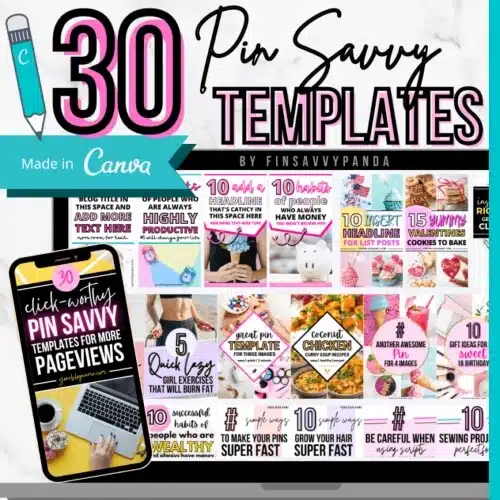
✅ Why These Templates Work:
- Made for bloggers by a blogger
- Fully customizable in free Canva
- Designs that actually get clicks
- Batch create pins in minutes, not hours
You just drag, drop, tweak the text ... and boom! Done.
👉 Grab your viral Pinterest templates here and start creating pins the easy way!
Real Quick
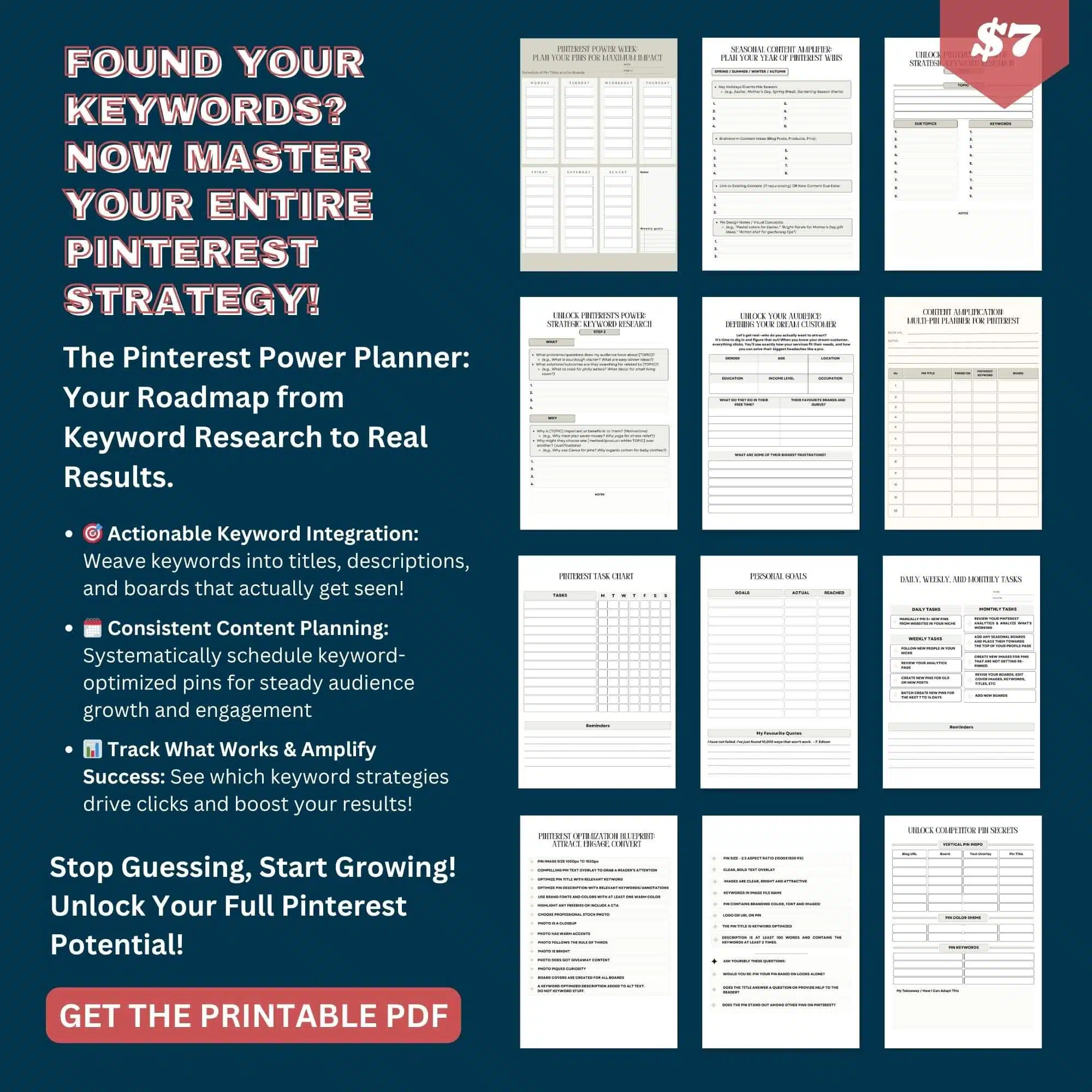
By the way, if you need a planner to stay organized with your weekly pins and keywords, then check out this Printable Power Planner below👇👇👇
21. Membership Access to Exclusive Content
Membership sites give paying members access to special content like templates, tutorials, or resources.
Create a private area with 20-30 premium items to start, then add new content monthly.
Offer Canva templates, printables, video tutorials, or business tools.
Charge $15-$47 monthly through Patreon, Memberful, or your website.
Pinterest users search for “design resources” and “business templates”.
Create pins showing sneak peeks of member-only content.
Members stay subscribed because they get ongoing value and community.
This builds steady monthly income that grows as you add members.
Start small with one content type and expand based on what members request most.
22. Mini-Online Courses
Mini-courses teach one focused skill in just one hour through short video lessons.
Pick narrow topics like “Create Your First Pinterest Pin in Canva” or “Write Your About Page in 60 Minutes”.
Record 4-6 videos of 10-15 minutes each.
Add a simple workbook or checklist. Host on Gumroad, Teachable, or send via email.
Sell for $17-$37.
Show the exact outcome students will achieve in your pins.
Busy people prefer short courses over long ones because they can finish quickly.
These are easier to create than full courses but still valuable.
23. Niche PLR Kits
Niche PLR kits are done-for-you products focused on specific topics that buyers can rebrand and resell.
Create affirmation card sets, wellness journal pages, budget planner sheets, or self-care checklists.
Include 15-30 items with editable Canva files and commercial use license.
Sell kits for $27-$67.
Pinterest users search for “PLR printables” and “done for you products”.
Target new sellers who want to start an Etsy shop quickly without creating from scratch.
Show all items included and clearly explain resell rights. Wellness, self-care, and productivity niches sell best.
This makes more profit than regular printables because you’re selling business solutions.
24. AI Prompts & Digital Productivity Dashboards
AI prompts are ready-made commands that help people get better results from ChatGPT, Abacus AI and other AI tools.
Create 50-100 prompts for specific tasks like writing blog posts, creating social media captions, or planning content calendars.
Add Notion or ClickUp dashboard templates that organize tasks and projects.
Sell prompt libraries for $12-$27.
Pinterest users search for “ChatGPT prompts” and “Notion templates”.
Show before-and-after examples of AI outputs using your prompts.
Busy entrepreneurs and content creators need these to save time and work smarter.
This is trending now as more people use AI tools but don’t know how to prompt effectively.
25. Freelance Contract & Proposal Templates
Contract templates protect freelancers legally when working with clients.
Create templates for different services like graphic design, writing, virtual assistance, or social media management.
Include proposal templates that help freelancers pitch their services professionally.
Make them editable in Google Docs or Canva.
Add instructions explaining each section.
Sell template packs for $17-$37.
Pinterest users search for “freelance contract template” and “client proposal template”.
New freelancers desperately need these but can’t afford lawyers.
Show sample pages with key sections highlighted.
Include email templates for following up with clients.
This solves a real problem and builds trust with your audience.
26. Digital Product Funnels & Sales Templates
Sales funnels are step-by-step systems that turn Pinterest visitors into paying customers.
Create done-for-you funnel templates including landing pages, email sequences, thank you pages, and sales pages.
Write the copy and design the pages in platforms like Canva or Google Docs that buyers can customize.
Include 5-10 email templates for nurturing leads. Sell complete funnel kits for $37-$77.
Pinterest users search for “sales funnel template” and “email sequence templates”.
New digital product sellers struggle with marketing and need these ready-made systems.
Show a flowchart of how the funnel works in your pins.
This saves buyers weeks of work and helps them make sales faster.
27. AI Tools for Productivity
AI productivity tools are custom GPTs, prompt templates, or automation workflows that help people work faster.
Create ChatGPT prompt collections for specific tasks like content batching, email writing, or brainstorming product ideas.
Make Zapier or Make.com workflow templates that automate repetitive tasks.
Include video tutorials showing exactly how to use them.
Sell toolkits for $17-$47.
Pinterest attracts entrepreneurs searching for “productivity hacks” and “AI tools for business”.
Show time-saving results like “create 30 social posts in 10 minutes”.
Busy online business owners will pay for tools that give them time back.
This niche is exploding as more people adopt AI.
28. Paper Goods
Paper goods are digital files for printable items like party invitations, greeting cards, gift tags, and custom fonts.
Create invitation templates for birthdays, weddings, or baby showers that customers personalize and print.
Design matching thank you cards, envelope liners, and favor tags. Add clip art sets and decorative fonts.
(Think clip art, invitations, fonts, etc)
Sell individual items for $3-$8 or party bundles for $15-$30.
Pinterest is perfect because people search for “printable birthday invitation” months before events.
Show the invitation styled in a party scene.
Parents and party planners love saving money by printing at home.
Create seasonal collections for holidays when demand spikes and sales multiply quickly.
29. Printable Planners, Meal Trackers & Gratitude Journals
Printable planners combine organization tools people can download and print at home.
Create daily, weekly, or monthly planner pages with space for tasks, goals, and notes.
Add meal planning pages with grocery lists and recipe cards.
Include gratitude journal prompts for daily reflection. Make 30-90 pages total.
Design in Canva or even Kittle, and save as PDF.
Sell for $7-$18.
Show filled-out examples so buyers see how to use them.
Moms, students, and organized people buy these repeatedly for different life areas.
Offer both letter and A5 sizes for more customers.
30. Lightroom Presets & Photo Filters
Lightroom presets are one-click filters that instantly edit photos with specific colors and moods.
Create preset packs for different styles like bright and airy, moody and dark, or warm and vintage.
Make 5-10 presets per pack that work well together.
Test them on various photo types like portraits, food, or landscapes.
Sell for $8-$25 per pack.
Pinterest users search for “Lightroom presets” and “Instagram filters”.
Show before-and-after photo comparisons in your pins.
Bloggers, influencers, and small business owners need consistent photo editing for their brands.
You need Lightroom software and basic editing knowledge, but YouTube tutorials teach this easily.
Don’t Miss This:
Digital Products to Sell on Pinterest in 2026 – The Wrap
You now have 30 proven ideas to launch your digital product business. The best part?
You don’t need fancy equipment or a huge budget to get started.
Pick one product from this list that matches your skills and interests.
Create it, list it on platforms like Etsy or your own website, and start promoting it on Pinterest.
Remember, every successful seller started exactly where you are right now.
The key is taking that first step and staying consistent.
Your financial freedom is waiting. These are the top digital products to sell on Pinterest.
Ready to Learn How to Start a Thriving Pinterest Blog? Click Here Now
Disclosure: This post may contain affiliate links, which means I’ll receive a commission if you purchase through my links, at no extra cost to you. Please read full disclosure for more information.
You Might Want to Check This Out Too
Resources To Grow Your Business With
Pinteresting
Struggling to get traffic from Pinterest? Pinteresting Strategies 2025 by Carly Campbell reveals a manual pinning method that works—even with algorithm changes.
This course walks you through step-by-step strategies to pin effectively, increase engagement, and grow your blog without relying on expensive schedulers.
Carly has used this exact system to bring in 100,000+ page views in just months, and now she’s sharing it with you.
Stop guessing and start seeing real results today!
Bluehost
Bluehost is a great starting point for beginners or bloggers who want to switch to a reliable web hosting service. And it gives you the best bang for your buck - starting at $2.95 a month*.
With the entry-level hosting plan, you'll get a high up-time, reliable customer support, FREE domain name (first year) and 30 day money back guarantee.
You can sign up with Bluehost here.
WPX Hosting
It's a web-hosting service I love using. It specializes in WordPress hosting, and depending on what package you opt for, you can host 5 or more sites on one account. The best bit is - the quick turnaround in support is top notch.
For bloggers who have an established blog, this is a fantastic option.
You can learn more about this service here.
Aweber
Building an email list of a growing audience is essential for the longevity of any business. This autoresponder service is easy to use, and it is a great starting point for someone looking to kickstart their email campaign.

Hi, I’m Jason Ou (surname aka, Oh). I am a Solopreneur and Blogger. My mission is to help fellow entrepreneurs (like you) to profit from their passion online. Let’s connect on Facebook now.